AI video generation
Haiper
Generate, repaint, and extend short videos from visual prompts.
What it does
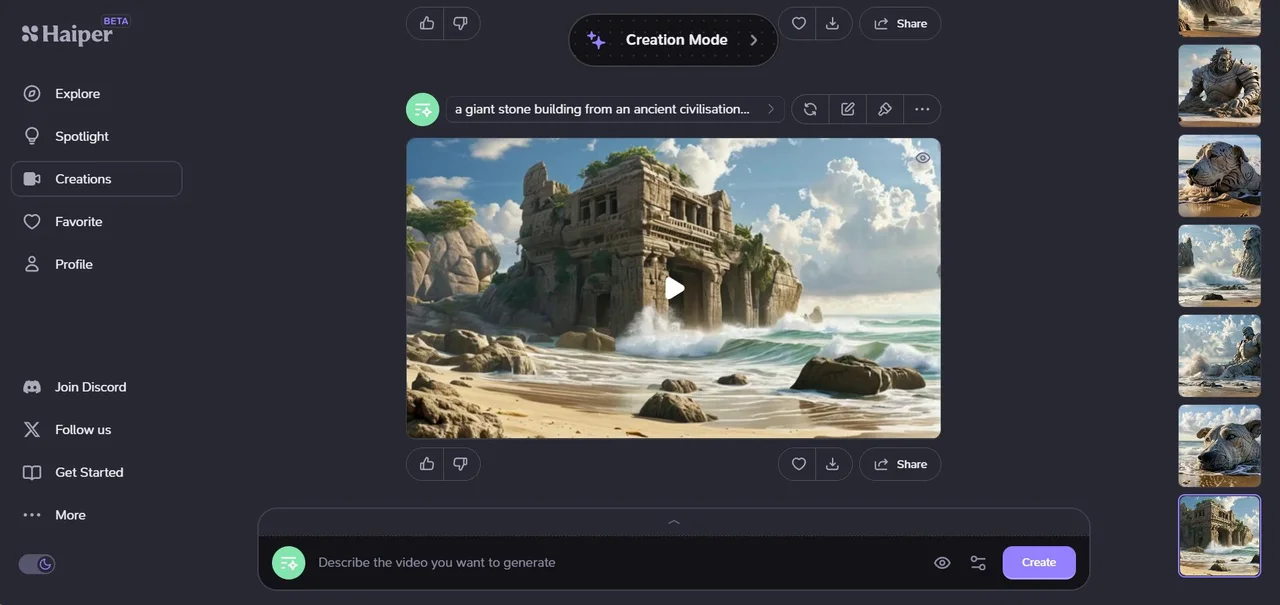
Haiper’s official documentation describes text-to-video, image animation, video repainting, and video extension in a browser-based generation workflow. Users can vary prompts or motion and select regions for repainting, while a history panel organizes results. The documentation also explains generation settings and a mobile interface, offering several ways to experiment with an initial visual idea.
Where it fits
Choose text, image, or video as the starting point and describe one clear change or action. Generate a short result, then vary the motion or prompt where needed. For repainting, select the affected region carefully and inspect the full clip for artifacts.
Before you commit
The landing page exposes little readable content; confirm current app access and available generation settings before planning a production.
Sources & editorial notes
This profile summarizes public product information and adds workflow guidance. It is not a hands-on performance review. Check the official website for current prices, limits, and availability.
Source check:
Keep exploring